In today's hyper-connected digital landscape, file sharing is the lifeblood of collaboration. From legal contracts to creative assets, terabytes of data traverse the internet daily. However, this convenience comes with significant risk. File sharing remains one of the most common vectors for data breaches, with unauthorized access often stemming from a simple, overlooked mistake: sending a sensitive contract via unencrypted email or leaving a confidential link open to the public.
As cyber threats evolve, becoming more sophisticated and targeted, so must our defenses. It is no longer enough to rely on standard email attachments or consumer-grade cloud storage settings. Here are the essential security best practices every professional needs to adopt to protect their data when sharing files online in 2025.
"Security isn't a feature you add on later; it's the foundation of trust. Treat every file you share as if your organization's reputation depends on it—because it often does."
1. Understanding End-to-End Encryption (E2EE)
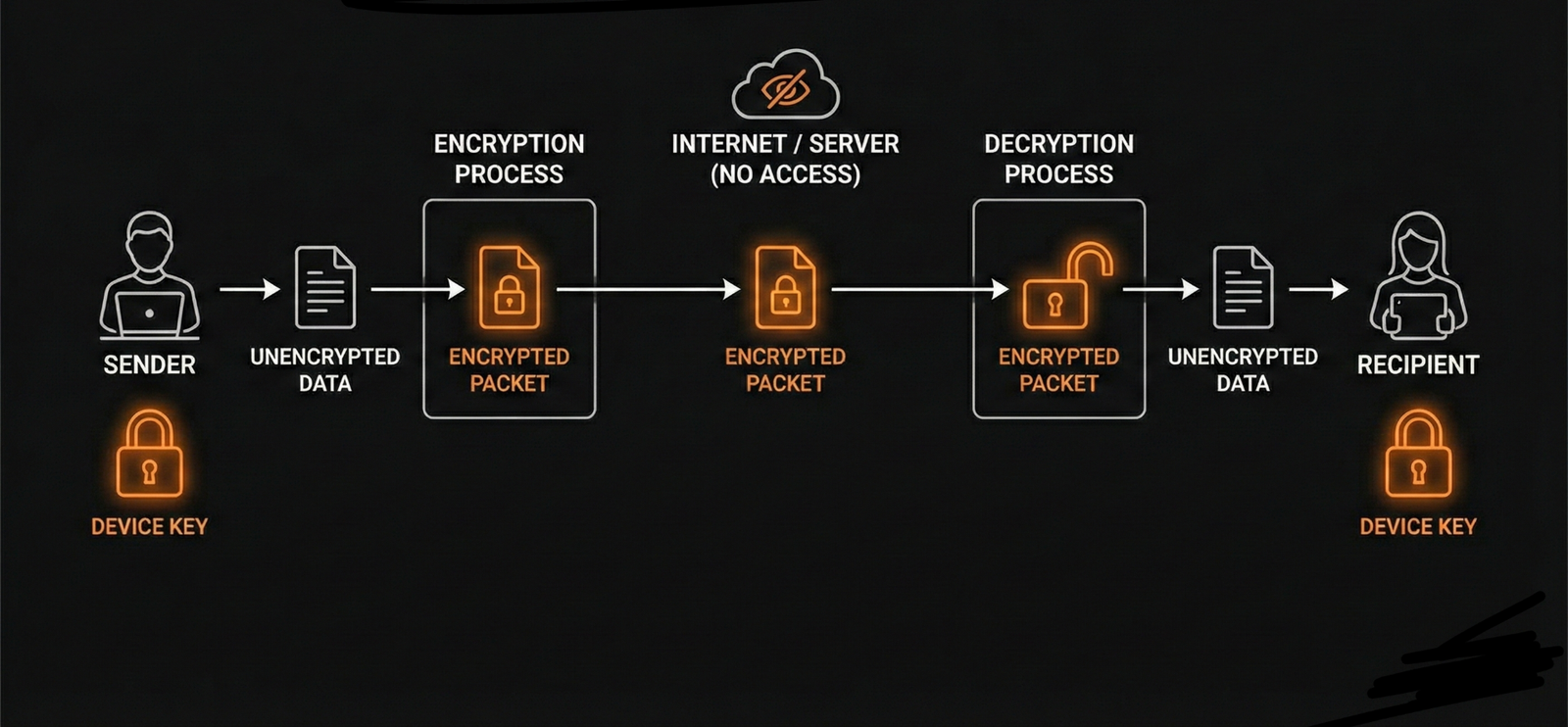
The gold standard for file security is End-to-End Encryption (E2EE). Many services encrypt data "in transit" (while it moves) and "at rest" (when stored on servers), but the service provider often holds the decryption keys. This means they—or a hacker who compromises them—can technically access your files.
E2EE ensures that your data is encrypted on your device before it ever touches the internet and stays encrypted until it reaches the intended recipient's device. The service provider acts merely as a blind courier; they cannot see the content of the package. Even if the file transfer service itself is hacked, the attackers would only see gibberish code, not your proprietary data.
2. Enforce Least Privilege Access
The principle of Least Privilege dictates that a user should only have access to the specific data and resources needed to complete their task—and nothing more. When sharing files:
- Avoid Public Links: Never use "Anyone with the link" permissions for sensitive documents. If that link is guessed or forwarded, control is lost forever.
- Verify Identity: Always restrict access to specific email addresses. Adopting a "Zero Trust" mentality means verifying every user before granting access, ensuring only those who absolutely need the file can open it.
- Role-Based Permissions: Differentiate between "Viewers," "Commenters," and "Editors." Does the recipient really need to edit the financial forecast, or just read it? Restricting edit rights prevents accidental data corruption.
3. Use Expiring Links and Passwords
Static links are a liability. If an old email thread is compromised years from now, a permanent link to a confidential folder could still be active, providing a backdoor into your organization. Mitigate this risk by imposing strict temporal limits:
- Setting Expiration Dates: Configure links to self-destruct after a set period, such as 24 or 48 hours. This drastically reduces the window of opportunity for an attacker.
- Password Protection: Add a unique, strong password to the file link. Crucially, share this password via a separate communication channel. For example, send the download link via email and the password via an encrypted messaging app like Signal or Slack. This ensures that if the email inbox is compromised, the attacker still cannot access the file.
4. The Human Firewall: Phishing Awareness
Technology is only as strong as the people using it. Cybercriminals frequently use social engineering to trick users into giving up access. "Quishing" (QR code phishing) and fake file-sharing notifications are on the rise.
Train your team to scrutinize file-sharing notifications. Is the email actually from the file-sharing platform, or is it a spoofed address? Does the login page look slightly off? Encouraging a culture of skepticism can prevent credentials from being harvested in the first place.
5. Audit Trails are Non-Negotiable
For compliance (GDPR, HIPAA, SOC2) and peace of mind, you need visibility. You must know exactly who accessed your files, when they opened them, and from what IP address.
Use professional platforms like DigifyRace that provide detailed audit logs. If a leak occurs, an audit trail allows you to conduct forensic analysis, tracing the breach back to the specific user account or time of access. This turns a potential mystery into a solvable incident and helps in plugging the security gap immediately.
6. Watermarking for Deterrence
Digital Rights Management (DRM) tools like dynamic watermarking serve as a powerful psychological and technical deterrent against unauthorized sharing. By automatically overlaying the recipient's email address, name, or the current date onto the document itself, you discourage them from taking screenshots or leaking the file.
If a leak does occur, the source is instantly identifiable via the watermark, making individuals much more cautious about how they handle your intellectual property.
By integrating these practices into your daily workflow, you move from being a passive target to an active defender of your organization's digital assets. Security is not about eliminating risk entirely—that is impossible—but about managing it so effectively that your data remains safe even in a hostile digital environment.